
This article assumes you have already updated all of the assets we recommend here: How do I set up my artist profile? If you have not yet done all of these, please do so before proceeding. That page also includes instructions on how to get to the "Edit My Profile" page.
Congrats on your first win! Winning in a Minted Challenge means we will need a few more things from you in order to process payments, put together the webpage where customers will see your work, and create the "About the Artist" items we include in every art print order shipped.
Below is an example of what the new artist overlay pages look like:
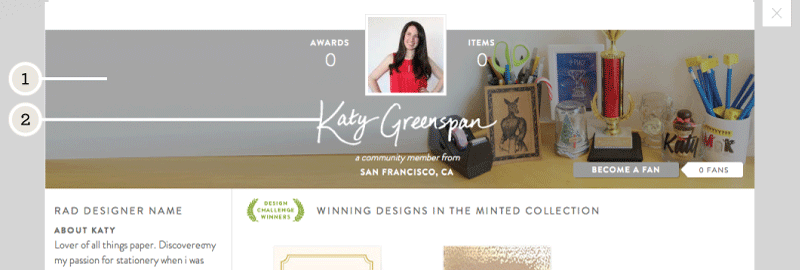
Please create and upload the following image assets:
- Cover image - jpg, gif, or png, 1920 px x 420 px
- Please create a cover image that reveals your workspace, tools, or a detail or pattern from your work. We'll apply a transparent overlay on top of your image to ensure legibility of your hand-written name and artist information. Upload this under "Artist Overlay Cover Image"
- Hand-written name - transparent png, (black, 415 px x 120 px; and white, 600 px x 160 px)
- The white version of your hand-written name will go over your cover photo. This should be your full name, first and last.
- The black version of your hand-written name will be printed in black on the certificate of authenticity that accompanies art print orders.
Detailed step by step instructions for creating these files can be found in this article: What is the hand-written name and how do I prepare it?
Once you have your first winning art print, you must also fill out the artist statement, this note will be displayed to customers on the product details page of your art prints on the Minted website and on the artist card that goes out with every art print order.
Comments
0 comments
Article is closed for comments.